Overview
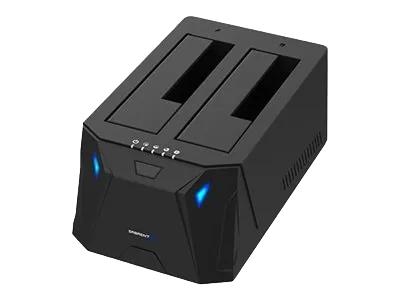
Standalone cloning lets you duplicate drives without a computer.
Cloning Steps
1. Insert Source Drive (HDD/SSD)
Place it in the SOURCE bay.
2. Insert Destination Drive
Place it in the TARGET bay.
The target drive must be equal or larger in capacity.
3. Power On the Dock
Wait for LED indicators to stabilize.
4. Press and Hold “Clone” Button
Release when the first LED begins flashing.
5. Wait for Cloning to Complete
LED bars will progress to 100%.
Important
All data on the target drive is erased.
Troubleshooting
- If cloning fails: drives may have bad sectors or mismatched sizes.